The short version
Usability score: 14/40. Scored against the ten standard usability principles (Nielsen heuristics) used across the industry; a typical healthy site lands between 28 and 35. This band means the core experience is broken, mostly by fixable technical faults.
Three independent reviews went into this report: an expert design review, an automated 27-pattern scan, and a business review of the customer journey. Where they agreed, you'll see it below.
Here is the surprising part: the biggest problems are not matters of taste. The site's main booking button is broken on every page. Two of the three choices on your homepage lead to error pages. The phone number on the contact page doesn't dial. Whatever we think of colours and fonts, right now a determined parent cannot easily become a client.
The second finding matters just as much: your words are already right. The writing on the Kontakt and first-consultation pages is warm, first-person and reassuring, exactly the "calm, step by step" brand in your brief. It's the shell around those words (a dark, corporate 2020 template) that contradicts them.
Fix this week: the broken buttons
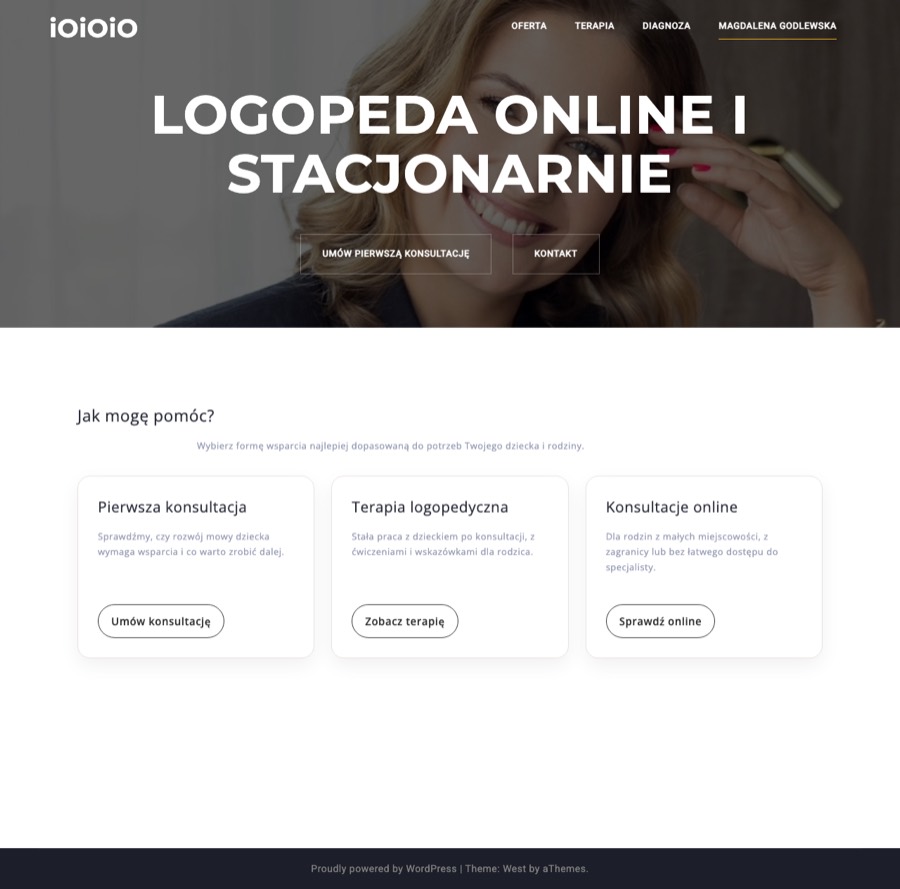
"Umów pierwszą konsultację" in the header of every page links to the site's internal page editor (wp-admin). A parent who clicks it at the exact moment of highest intent sees a login screen and reasonably concludes the site is broken or hacked. Fix: point it at your first-consultation page, which already exists and is good.
"Zobacz terapię" and "Sprawdź online" link to page addresses that don't exist (/terapia-logopedyczna and /konsultacje-online both return 404). Two-thirds of the choices you offer visitors are dead ends. Fix: repoint to /terapia/ and /kontakt/.
Both point to page anchors that no longer exist, so clicking them has no effect. The two most important trust actions (contact and "who is this person") are unreachable from the menu. Meanwhile the Kontakt page itself, and your best sales page (first consultation), are not in the menu at all.
On the Kontakt page the number is linked as a web address (http://+48690260066) instead of a phone link (tel:). On a phone, tapping it opens a browser error instead of the dialler.
The only way to reach you is to leave the site and compose an email from scratch, remembering the four things you ask people to include. Every step of friction at this moment loses real families. (Your "what to write in your first message" checklist is excellent; it should become the fields of a form.)
What a worried parent actually experiences
We walked the site as its real visitor: a mother of a four-year-old who isn't talking much, browsing on her phone at 22:30 after the children are asleep. Her journey today:
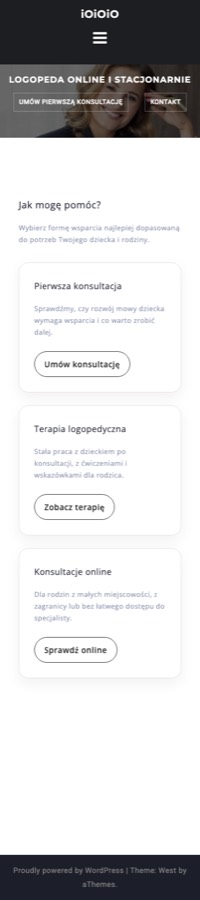
She lands on the homepage. First screen: a dark photo, large capital letters saying "LOGOPEDA ONLINE I STACJONARNIE". Nothing tells her she's in the right place, what this will cost, or what to do first. The one warm element, your smile, sits behind a 60% black overlay with text across the face.
She taps the booking button. WordPress login screen. Most parents stop here.
She tries the cards instead. "Zobacz terapię": error page. "Sprawdź online": error page. Only "Umów konsultację" works and takes her to Kontakt.
On Kontakt she taps your phone number. Browser error. She can copy the number by hand, or switch to her email app and write from a blank page.
If she reads Oferta on the way, she meets a paragraph saying negative words sink into a child's subconscious. She came worried; the page has made her feel guilty too. The genuinely reassuring page (first consultation: what happens, what you'll know afterwards) is the one page nothing links to.
The likely outcome is not a complaint; it's silence. She messages a competitor with a Facebook page and a booking calendar instead.
The usability scorecard
Each principle scored 0 to 4. A 4 is genuinely excellent; healthy sites average 3s.
| Principle (plain terms) | Score | The key issue |
|---|---|---|
| You always know what's happening | 1/4 | Buttons that do nothing, no feedback anywhere, contact by blind email |
| It speaks your language | 2/4 | Kontakt is warm and plain; Terapia and Diagnoza read like clinical textbooks |
| You can always get back out | 2/4 | The wp-admin dead end offers a parent no way back to booking |
| Everything behaves consistently | 1/4 | Two different design systems collide: the 2020 theme and newer hand-added sections share no fonts, buttons or colours |
| Mistakes are prevented | 1/4 | Nothing catches the broken links users hit constantly |
| You don't have to remember things | 1/4 | Contact and prices aren't in the menu; the email checklist must be memorised |
| There's a quick way for everyone | 1/4 | One rigid path: compose your own email. No form, no calendar, broken phone link |
| Clean and focused | 2/4 | Homepage is tidy; inner pages are walls of text under a repeated hero |
| Errors help you recover | 1/4 | Error pages are generic; the login dead end explains nothing |
| Help is there when needed | 2/4 | The "what to write" checklist is genuinely good; it's also the only help on the site |
| Total | 14/40 | "Poor" band: core experience broken, mostly by fixable faults |
Look and feel: the details
Two websites in one
The site is visibly mid-migration between two eras. The 2020 layer (Oferta, Terapia, Diagnoza, Numicon) is the free "West" WordPress theme at its defaults: dark header, amber accent colour, giant capital-letter hero, "Proudly powered by WordPress" in the footer. The 2026 layer (homepage cards, Kontakt, first-consultation page) has different fonts, different buttons, and much better writing. They share nothing, and a visitor feels the seam without knowing why the site seems unfinished.
Colour and readability
The palette is a dark corporate grey with an amber accent, closer to a law firm's template than a children's practice; nothing in it says warmth, children, or care. It also fails accessibility measurably. Contrast is how strongly text stands out from its background; the accessibility standard (WCAG AA) requires at least 4.5:1 for body text. Measured on the live site:
In plain terms: the two things people read most, your paragraphs and your buttons, are genuinely hard to read, especially for a tired parent on a phone at night. Body text is also set at 13 to 14px, smaller than comfortable.
Typography
Three unrelated font families load on every page, one of them in all nine weights (pure page-weight waste). Meanwhile the content has almost no hierarchy: the automated scan measured headings barely larger than body text, and on tablet-sized screens a stylesheet bug shrinks every heading to 13px, smaller than the paragraphs below them. Long passages are also centre-aligned with stretched letter-spacing, which makes Polish's long words genuinely harder to read.
One photo, used against itself
The whole site contains exactly one photograph: your headshot, which is warm, professional and precisely the trust signal a parent needs. It's used as a darkened background wallpaper with 76px capitals stamped across the face, identically on all seven pages. There are no photos of children, materials or your practice; Numicon tiles alone would be wonderfully photogenic. Your single best asset deserves to be seen, next to your name and story, on an About page that currently doesn't exist.
Mobile
Most of this audience arrives on phones. Today: hero buttons at 12px with tiny tap areas, the menu depends on a script injecting into an empty element (if that script fails, there is no navigation at all), and the phone link is broken. Mobile is not an edge case for IOIOIO; it is the primary device, and it currently gets the worst experience.
(44px standard)
today (~22px)
How the offer comes across
The business lens: does the site sell what you offer?
A first-time visitor cannot tell within five seconds who this is for, what problem it solves, or what to do first. The only positioning statement on the entire site is the header microcopy "Logopeda online i stacjonarnie". Your brief already contains the right headline: "Wsparcie mowy i czytania Twojego dziecka w domu — spokojnie, krok po kroku."
A free first consultation is a genuinely strong, risk-free invitation. Today it appears mid-paragraph on Oferta, wrapped in clinical framing about rules and the child's subconscious, and connects to no booking action. It should be the site's headline offer.
No About page, no credentials list, no testimonials, no story. The Terapia page mostly describes the Krakow Method and credits its founder, building the method's authority rather than yours. A parent chooses a person, not a method.
Five services and prices in one unbroken block, no descriptions, no "book" button after them. The page simply ends. (Publishing prices at all is right, and rare; keep that.)
The first-consultation page (what happens, what you'll know afterwards) is the most persuasive page on the site, and nothing links to it. It exists only for people who already know the address.
Fit with the IOIOIO strategy
Your brief describes a digital-product education brand: PDF materials for parents, sold repeatedly, with consultations as the premium service, for families in Poland and abroad. Measured against that, the current site covers almost none of the ground. This is not a criticism of the site; it was built for a different business (a local therapy practice, 2020) and it shows how much the Shopify build genuinely has to add.
Strategy readiness: 0 of 8 building blocks exist today. Shop, email capture, About page, diaspora section, articles, testimonials, legal pages, and the "worry into a calm plan" promise: each is required by the brief, and none is on the current site.
The empty ring is the honest picture, and also the argument for building fresh rather than renovating.
| The strategy needs | Today |
|---|---|
| A shop: product pages, cart, payment (BLIK + cards), instant PDF delivery | None exists |
| Email capture: newsletter, free sample pack as the sign-up incentive | None exists |
| An About page carrying your credentials and story | Missing (text is ready in the brief) |
| A section for Polish families abroad | One sentence on the homepage; its button 404s |
| Articles answering parents' worry-questions (the traffic engine) | None; the only post is the WordPress default |
| Testimonials and FAQ | None |
| Legal pages for selling online: terms, privacy/RODO, digital-goods withdrawal consent, business details, VAT handling for EU sales | None exist |
| The "worry into a calm plan" promise, stated and delivered | Intake copy is warm, but no plan is offered or sold anywhere |
One consequence worth naming: the future architecture is not a restyling of the current site. It's a different information structure (home, shop, product pages, about, materials/blog, for-families-abroad, consultations, contact, legal), which is exactly why building it fresh on Shopify is the right call rather than renovating the template.
What to keep
- The voice. The Kontakt and first-consultation writing ("rozmawiam z rodzicem, badam i obserwuję dziecko… daję konkretne zalecenia") is the IOIOIO brand, already written. The new site should sound exactly like this, everywhere.
- The photo. Warm, professional, trustworthy. Use it in daylight: large, uncovered, beside your name and story.
- Transparent pricing and the free first consultation. Rare, honest, and a strong anchor for pricing the PDF products later ("less than one therapy session").
- The "what to write in your first message" checklist. Ready-made structure for the new contact form's fields.
Recommendations
If we keep the current site running: six small repairs
- Repoint the header booking button to the first-consultation page.
- Fix the two homepage card links (to /terapia/ and /kontakt/).
- Rebuild the menu as real page links: Oferta, Terapia, Diagnoza, O mnie, Kontakt; add the first-consultation page.
- Fix the phone link so it dials (tel:+48690260066).
- Add a simple contact form using your four-question checklist as its fields.
- Darken the body text colour and remove the guilt-framing paragraph on Oferta.
These overlap with the SEO report's quick wins and would need WordPress and hosting logins. Whether they're worth doing at all is an open decision: the alternative is to leave the old site untouched and put everything into the new build.
For the Shopify build
- Design from the brief's brand: warm palette, readable type (16 to 18px body, real contrast), your photo in the open, the existing voice carried across every page.
- Architecture per the table above: shop and product pages first-class, About page, families-abroad section, materials/blog, booking for consultations.
- Mobile-first throughout: 44px touch targets, menu that works without tricks, one-tap call and book.
- Every page ends with one clear next step; no dead ends.